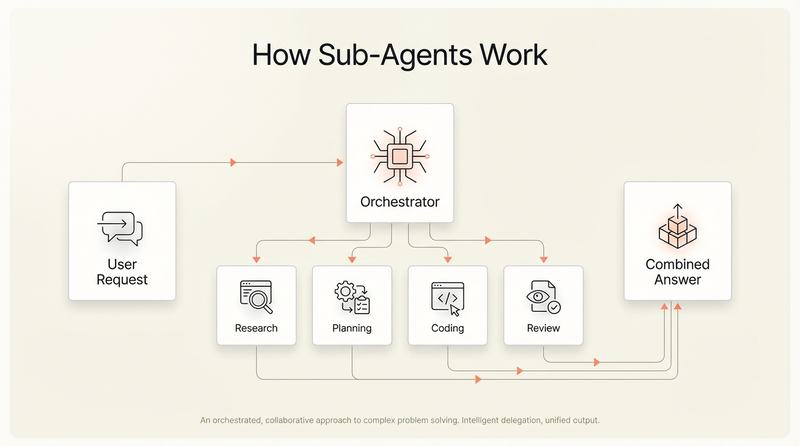
The most sophisticated teams are not running a single agent on a single task. They are composing workflows from multiple specialised agents, each handling a different part of the development lifecycle. Cline already supports splitting tasks across planning and coding roles. Devin integrates with Slack, Linear, and Jira to pick up work autonomously. GitHub's coding agent runs in the background and produces reviewable PRs.
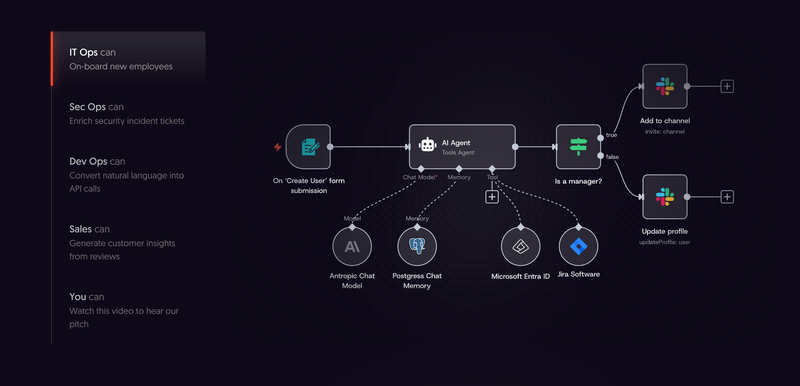
For teams ready to build these composed workflows, the tooling has matured quickly. n8n provides a visual workflow builder where you can chain agents with conditional logic and human approval gates between steps. CrewAI takes a different approach: you define role-based agent crews that delegate tasks among themselves, with built-in tracing of every agent decision. For teams that want full code-level control, LangGraph models your agent pipeline as a state graph with explicit nodes and edges.[11] And if none of those fit, building custom orchestration on top of the Claude Agent SDK, Google ADK, or PydanticAI is a viable path for teams with specific security or compliance requirements.
Deloitte's 2026 State of AI report found that close to three-quarters of companies plan to deploy agentic AI within two years. But only 21% report having mature governance in place.[9] The ambition is well ahead of the guardrails.
Governing this in practice means answering a few specific questions before you deploy.
Define the boundaries before you deploy. Which tasks can an agent handle autonomously? Which require human review before merging? Start with well-scoped, lower-risk tasks: bug fixes with clear reproduction steps, test generation, documentation updates, dependency upgrades. Expand the boundary as trust builds.
Treat agent output like junior developer output. Review it carefully. Do not merge it automatically. The bugs agents produce are different from the bugs humans produce. They are often structurally correct but contextually wrong, missing business logic that was never written down, or solving the wrong problem confidently. Reviewers need to know they are reviewing agent work and adjust accordingly.
Build observability into agent workflows. You need to know what an agent did, why it did it, and what it changed. Every agent action should produce a clear audit trail. If you cannot explain what the agent did to a non-technical stakeholder, your governance is not ready.
Set cost controls early. Agentic workflows burn tokens fast. A single complex task can run through thousands of API calls as the agent plans, executes, tests, and iterates. Without usage limits and monitoring, costs can surprise you. Set per-task and per-day budgets before someone discovers the hard way that an agent spent the weekend refactoring a monolith.
Do not skip the cultural conversation. Engineers have real concerns about agents. Will this replace my job? Will I spend all day reviewing AI-generated code instead of building things? These are legitimate questions. The honest answer is that agents change what engineers do, not whether they are needed. Less writing, more reviewing, more architecture, more directing. The teams where this works are the ones where leadership is transparent about the shift.